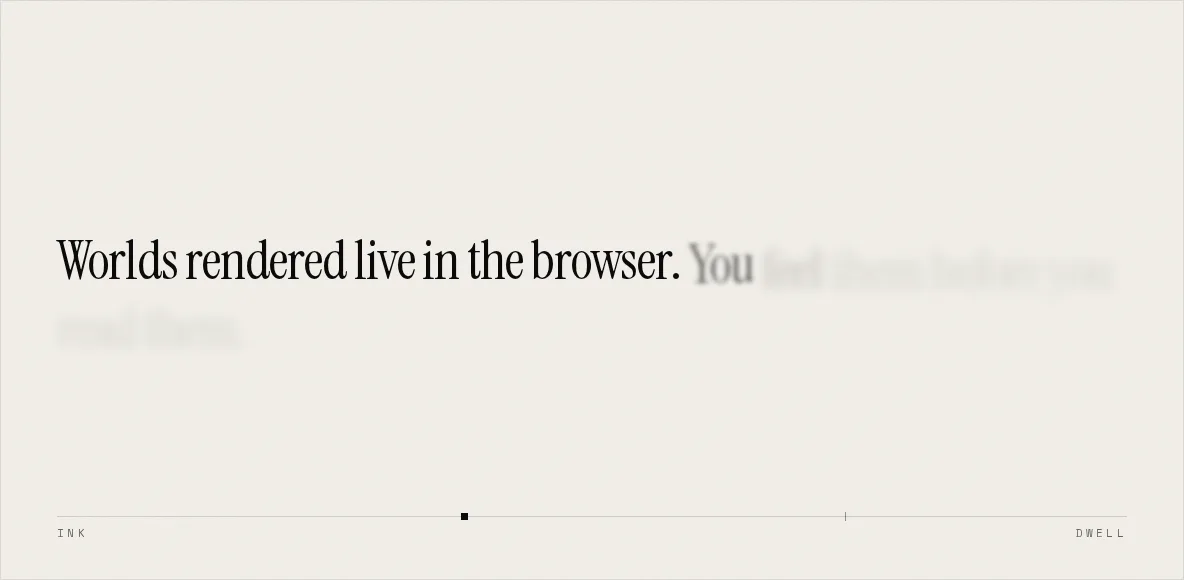
Scroll does not start this animation. Scroll is the animation's clock.
A triggered animation is fire-and-forget. The reader crosses a line, something plays at its own speed, and from that moment the two are strangers. Scroll back up and nothing rewinds. A scrubbed timeline binds the playhead to a range of scroll instead, so the reader isn't an audience. Their hand is on the transport, and the animation can neither get ahead of them nor fall behind.
The statement is one timeline over thirteen words. Each starts at opacity: 0.12 under a 6px blur, ten pixels below where it belongs, and resolves to full contrast, no blur, no offset. Nothing in that list is unusual. What makes it read as handwriting rather than as thirteen fades is the spacing, an empty beat at the end, and the fact that the panel it happens on is not pinned.
Half a beat behind
STAGGER is 0.5 and WORD_DUR is 1, so a word begins inking when the word before it is halfway resolved, and two or three are always mid-stroke. That overlap is the effect. Set the stagger equal to the duration and the words queue, arriving one finished block at a time like a slideshow. Set it to zero and there's no sequence left at all. Try both on the demo, it takes ten seconds and you'll never forget the difference.
// Scroll inks the sentence in, word by word. Edit the line freely,
// nothing downstream counts the words.
const STATEMENT = "Worlds rendered live in the browser. You feel them before you read them.";
const WORDS = STATEMENT.split(" ");

const STAGGER = 0.5; // beats between one word starting and the next
const WORD_DUR = 1; // beats one word takes to resolve
const DWELL = 2.5; // beats the finished sentence holds before the panel unpinsThirteen words at that spacing make the inking (13 − 1) × 0.5 + 1 = 7 beats long. The ease is none, and that's deliberate: the reader's hand is already supplying the easing. Put a curve on top and a word accelerates through a stretch of scroll the wheel was crossing at constant speed, which reads as the page holding an opinion about when you should be reading.
const STATEMENT = "Worlds rendered live in the browser. You feel them before you read them.";
const WORDS = STATEMENT.split(" ");
/** how long one word takes to resolve, in the timeline's own beats */
const WORD_DUR = 1;

// The homepage sum, by hand: a time on the playhead in, thirteen word states
// out. Nothing is remembered, so the same time always gives the same sentence.
function Sentence({ time, stagger }: { time: number; stagger: number }) {
  return (
    <p className="font-serif text-[clamp(22px,4.4vw,54px)] leading-[1.08] tracking-[-.02em]">
      {WORDS.map((w, i) => {
        const start = i * stagger;
        const p = Math.max(0, Math.min(1, (time - start) / WORD_DUR));
        const opacity = 0.12 + p * 0.88;
        const blur = (1 - p) * 6;
        const y = (1 - p) * 10;
        return (
          <span
            key={i}
            className="inline-block"
            style={{
              opacity,
              filter: blur ? `blur(${blur.toFixed(2)}px)` : "none",
              transform: y ? `translateY(${y.toFixed(2)}px)` : "none",
            }}
          >
            {w}
            {i < WORDS.length - 1 ? " " : ""}
          </span>
        );
      })}
    </p>
  );
}1 the words queue; at 0 the sentence is a single fadeWORD_DUR − STAGGERThe beat where nothing happens
tl.to({}, { duration: DWELL }, ">") tweens an empty object for two and a half beats. No target, no property, no visible change. The line exists to occupy time, and it's the most valuable one in the component.
Here's why. Without it, the last word resolves at the end of the timeline, which is the end of the ScrollTrigger's range, which is the moment the panel starts to leave. The reader never sees the finished sentence standing still. They watch it complete and depart in one gesture. Two and a half beats of nothing is 26% of a 9.5-beat timeline, so about 38vh of scroll passes with the statement fully inked and motionless. A landing instead of an exit, bought with a tween of nothing.
// all fifteen words for the life of the page. The provider's own comment is
// explicit that hundreds of resident layers cost real memory, and it
// releases its own; this component was the one holding them permanently.
words.forEach((w) => (w.style.willChange = "opacity, transform, filter"));
const release = () => words.forEach((w) => (w.style.willChange = "auto"));

const ctx = gsap.context(() => {
  const tl = gsap.timeline({
    scrollTrigger: {
      trigger: sectionRef.current,
      start: "top top",
      end: "bottom bottom",
      scrub: 0.6,
    },
  });

tl.fromTo(scrub: 0.6 supplies the rest of the feel. A scrub of true welds the playhead to the scroll position exactly. A number gives it that many seconds to catch up, so the words trail the wheel slightly and settle after you've stopped. Stop halfway and the sentence stays halfway: some words solid, one mid-stroke, the rest still ghosts. That state is worth checking on any scrubbed build, because a timeline that only looks right at 0 and 1 is a triggered animation wearing a costume.
Sticky, not pinned
ScrollTrigger has pin, and this doesn't use it. Pin earns the held-still feel by taking the element out of flow, fixing it, and inserting a spacer of exactly its height so the document doesn't collapse. A layout edit performed in the middle of a scroll. The scroll position here belongs to Lenis, eased toward a target at lerp: 0.08 and feeding ScrollTrigger by hand through lenis.on("scroll", ScrollTrigger.update). Rewriting document height underneath that is a fight I chose not to pick, particularly when CSS already ships the feature.
So the section is a plain tall track at 245vh, and the panel inside it is position: sticky, top: 0, min-h-screen. The panel holds the viewport for the length of the track, and the track, never the panel, is the trigger. start: "top top" to end: "bottom bottom" across 245vh leaves 145vh of real scroll once the panel's own screen is subtracted, and the timeline's 9.5 beats map onto that. The beats are ratios. The 245vh is what turns them into distance.
        trigger: sectionRef.current,
        start: () => `bottom ${TOP_FADE.full + rise()}px`,
        end: () => `bottom ${TOP_FADE.gone + rise()}px`,
        onUpdate: (self) => setFade(self.progress),
        onRefresh: (self) => setFade(self.progress),
      });
    }
  }, sectionRef);
  return () => {
    release();
    ctx.revert();
  };
}, [reduced]);

return (
  <section
    ref={sectionRef}
    // the Lab's scrub article deep-links here
    id="scrub"
    className="relative z-[1]"
    style={{ height: reduced ? "auto" : "245svh" }}
  >
    <div
      ref={panelRef}
      className="flex min-h-[100svh] items-center px-gutter py-[clamp(60px,12svh,140px)]"
      style={{ position: reduced ? "static" : "sticky", top: 0 }}
    >
      {/* The real sentence for screen readers; the scrubbed copy below is presentation.
          Each visual word renders via ::before/attr() so its faint pre-scroll ghost
          state isn't judged as low-contrast body text — it inks to full contrast on
          scroll (and is fully opaque under reduced motion). */}
      <p className="sr-only">{STATEMENT}</p>
      <p ref={paraRef} aria-hidden className="max-w-[1180px] font-serif text-[clamp(34px,6vw,108px)] font-normal leading-[1.04] tracking-[-.02em]">
{WORDS.map((w, i) => (A sentence with no text in it
The visible words are empty span elements. Each carries its own word in a data-word attribute, and the glyphs arrive through a ::before rule whose content is attr(data-word). Generated content, not a text node. The trailing space lives inside the attribute rather than the markup, because inline-block siblings would otherwise close up against each other.
Why go to that trouble? The ghost state. Twelve per cent opacity under a 6px blur is an automatic contrast failure as real text, and it's the state a checker or a scraper meets first, because neither of them scrolls. As generated content there's no body copy to judge. The real sentence lives once, above, in an sr-only paragraph, and the visual copy is aria-hidden. Two renderings, one STATEMENT constant, so they can't drift.