Skip to content
Case study — 03 / 06 · index

Symbionic EMG Studio

A Windows workstation that shows a bionic arm's six muscle signals live and takes a patient through calibration, with or without the arm.
Project
Symbionic EMG Studio
Role
Design and build, solo
Status
Windows demo, v1.1
Try it
EMG Studio · live signal
01Overview
ProductSymbionic EMG Studio
SectorProsthetics, clinical software
Year2023 prototype, 2026 rebuild
ScopeWindows app, simulator, installer, release pipeline
TeamSolo, design to installer
Description

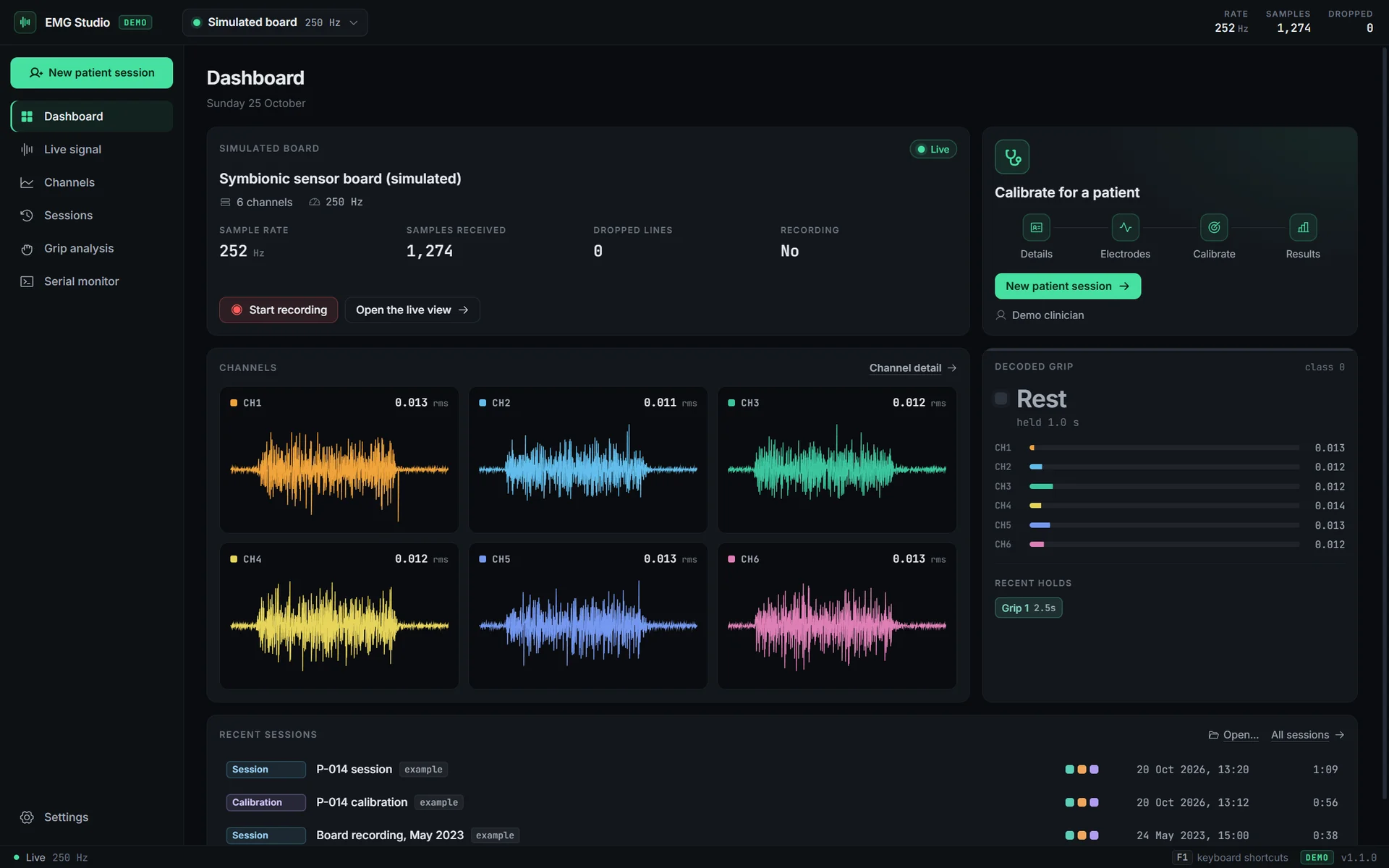
Symbionic EMG Studio is a desktop workstation for the muscle signals that drive a bionic arm, built so a clinician can calibrate the arm for a patient and see exactly how well it reads them.

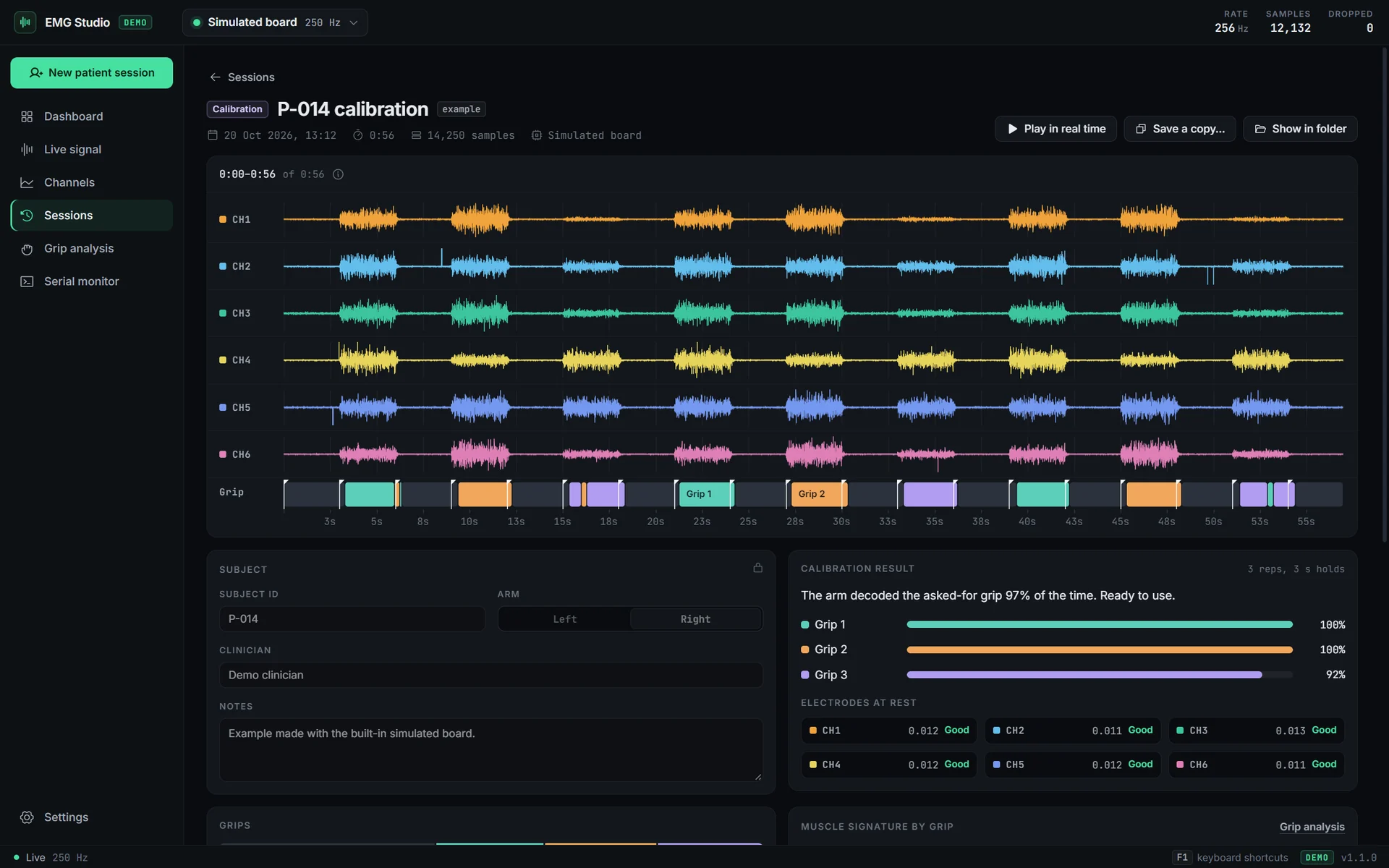
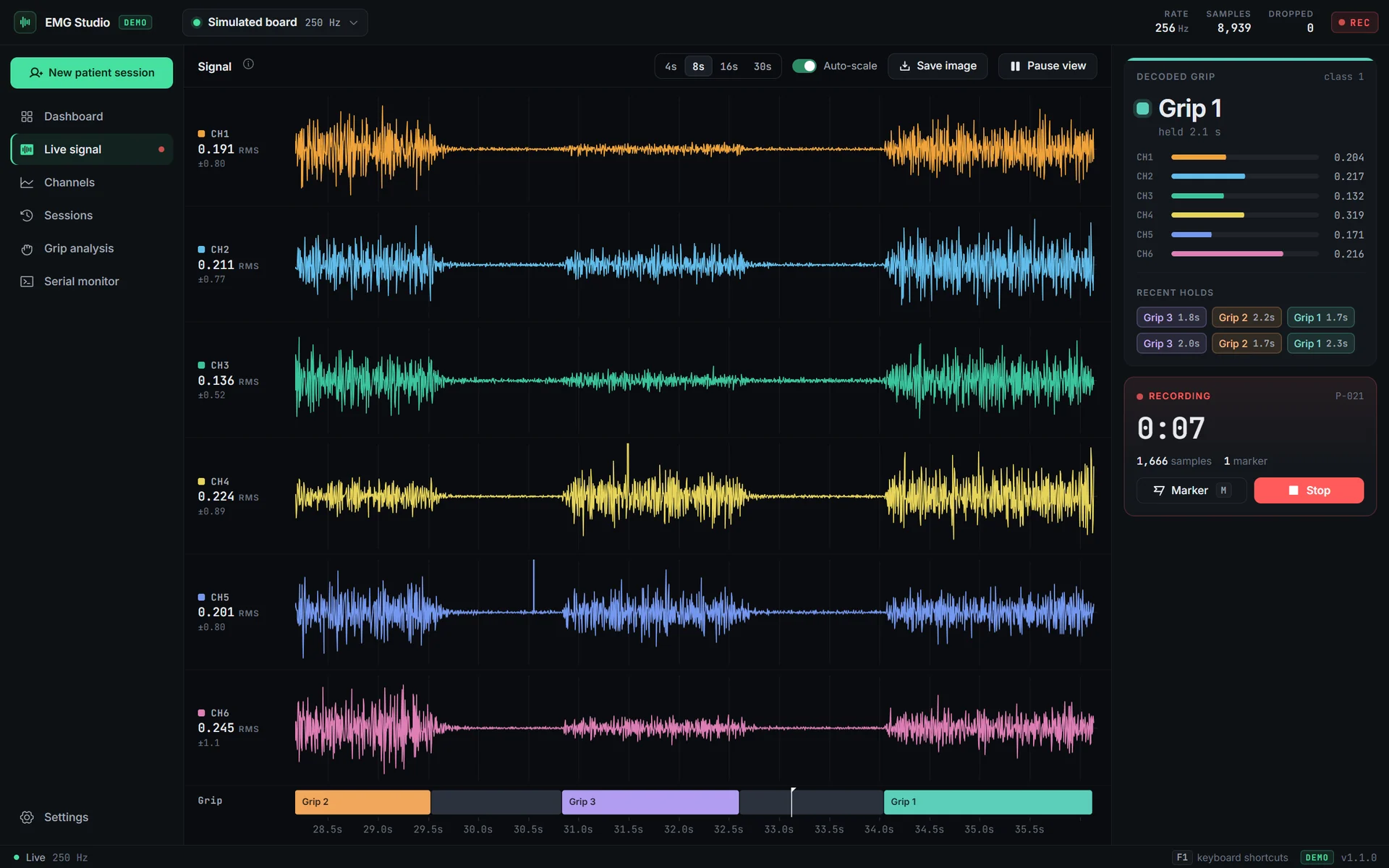
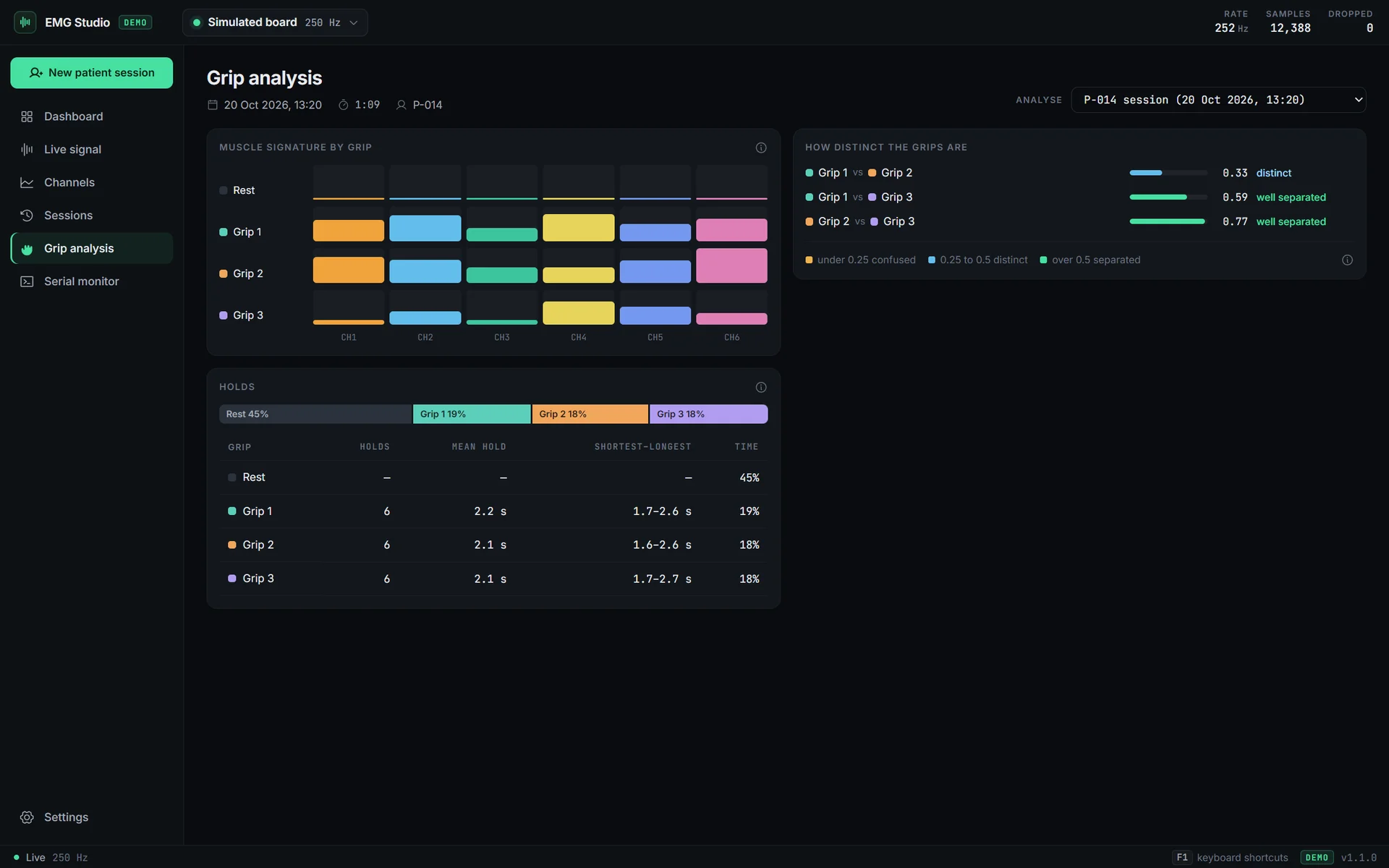
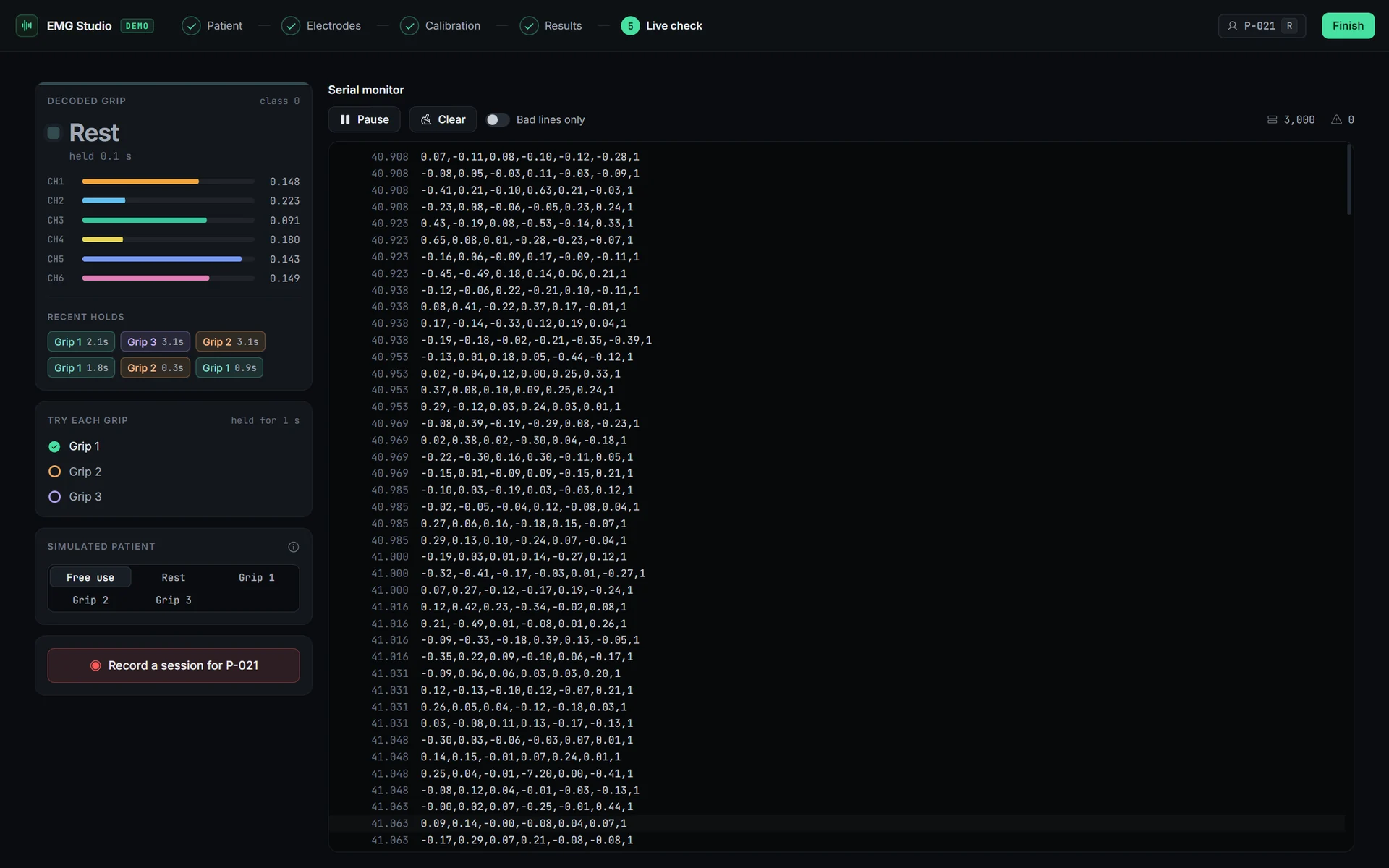
The Symbionic sensor board sends six channels of EMG, and the grip the arm has decoded, as text lines over USB serial, about 250 a second. The app draws all six live on one time axis with the decoded grip beneath, records sessions under a subject ID with markers, and reduces each grip to a signature: every channel's RMS while the grip is held, estimated from the median of squares so a single saturation spike cannot skew it.

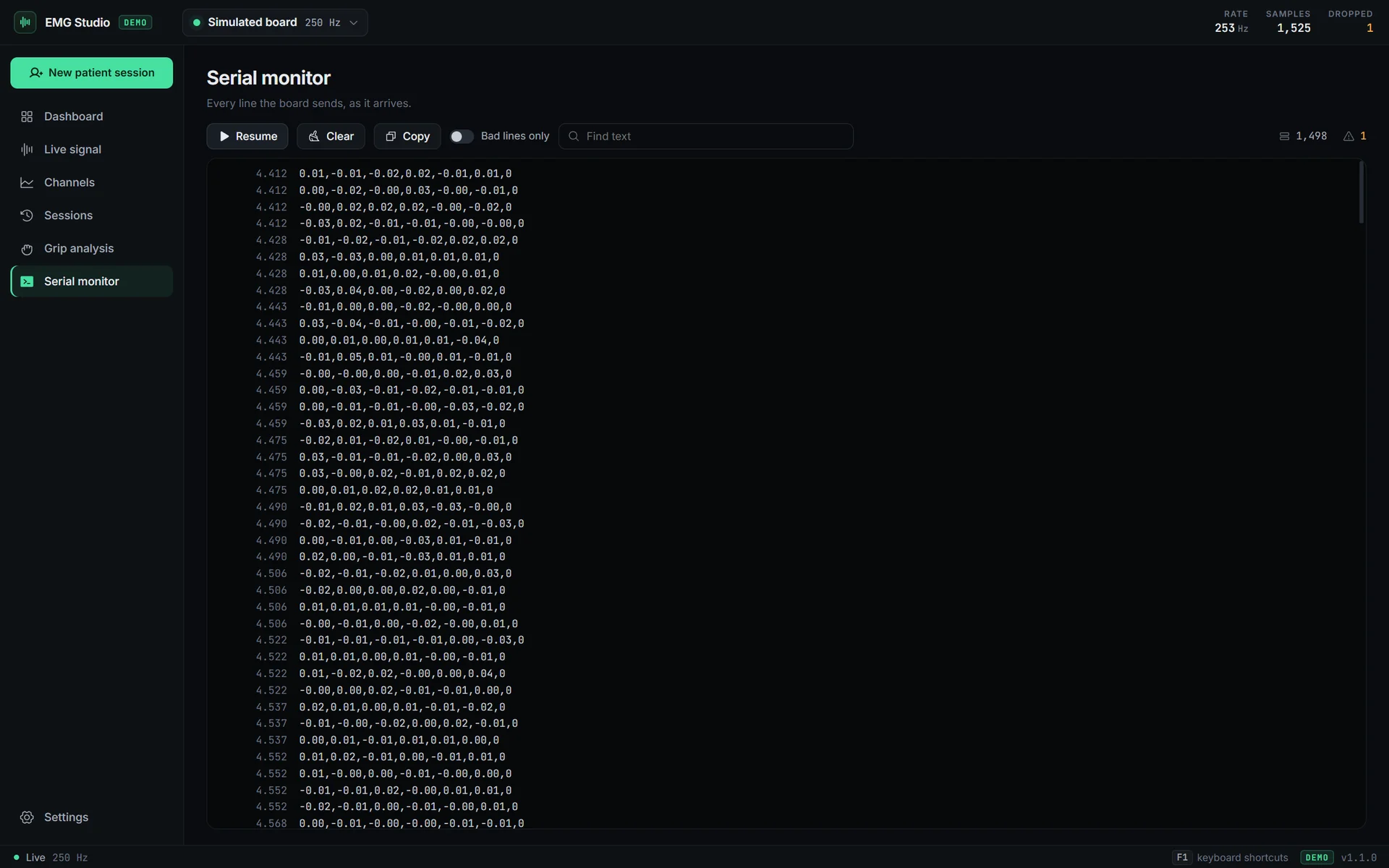
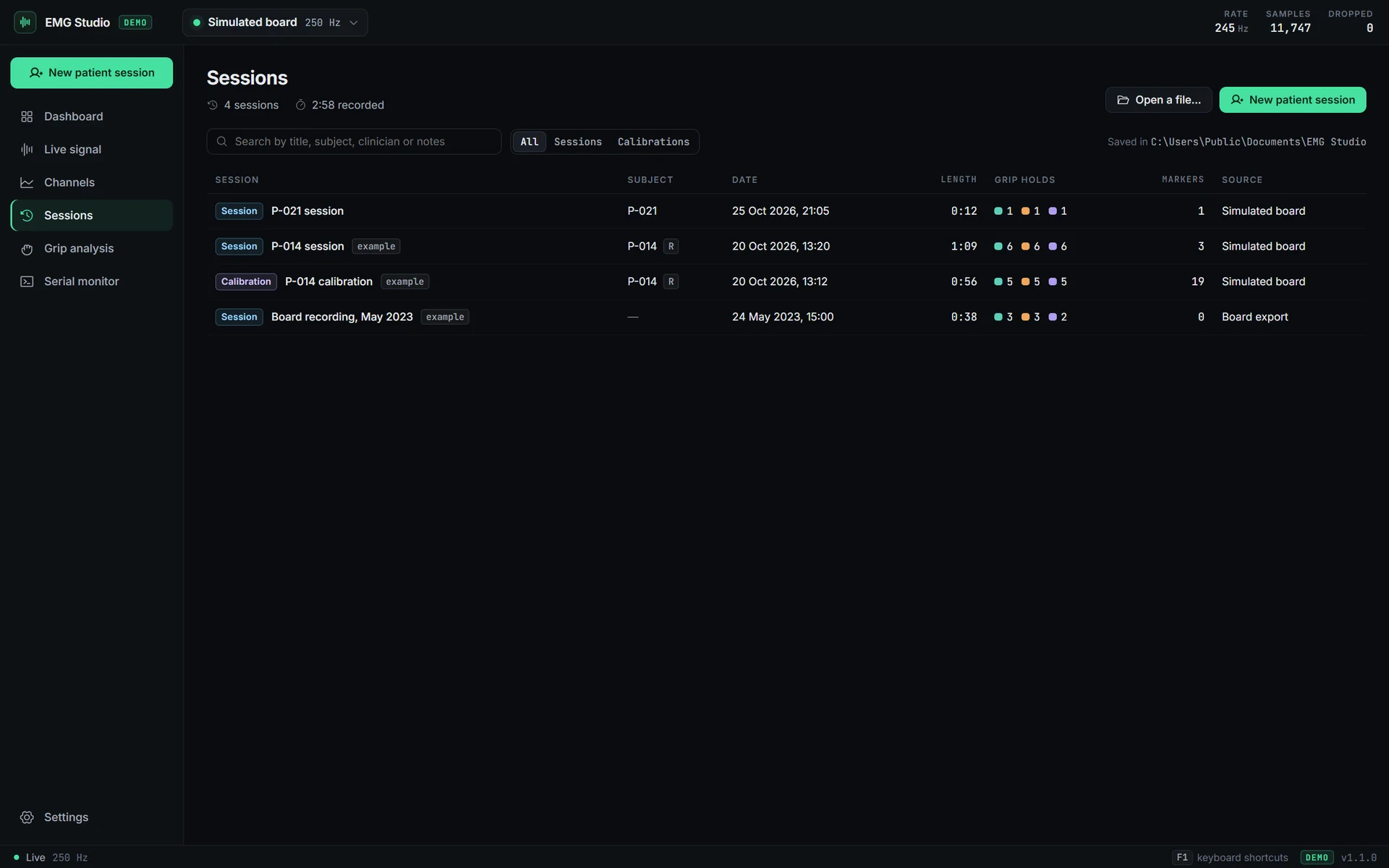
Around that sit a dashboard, a searchable session log, channel detail with a power spectrum, grip analysis, a serial monitor that explains every line it refuses, and a second window that walks a patient through electrode checks and a guided calibration. It ships as two editions from one codebase: the standard edition connects to the board, and the demo, the download on this page, has a simulated board built in, so every screen works with no hardware.

In 2023 I built a prototype of this during an internship at Symbionic, and it could only chart a saved file. I rebuilt it as the tool a clinician actually needs.
Flagship · the calibration result

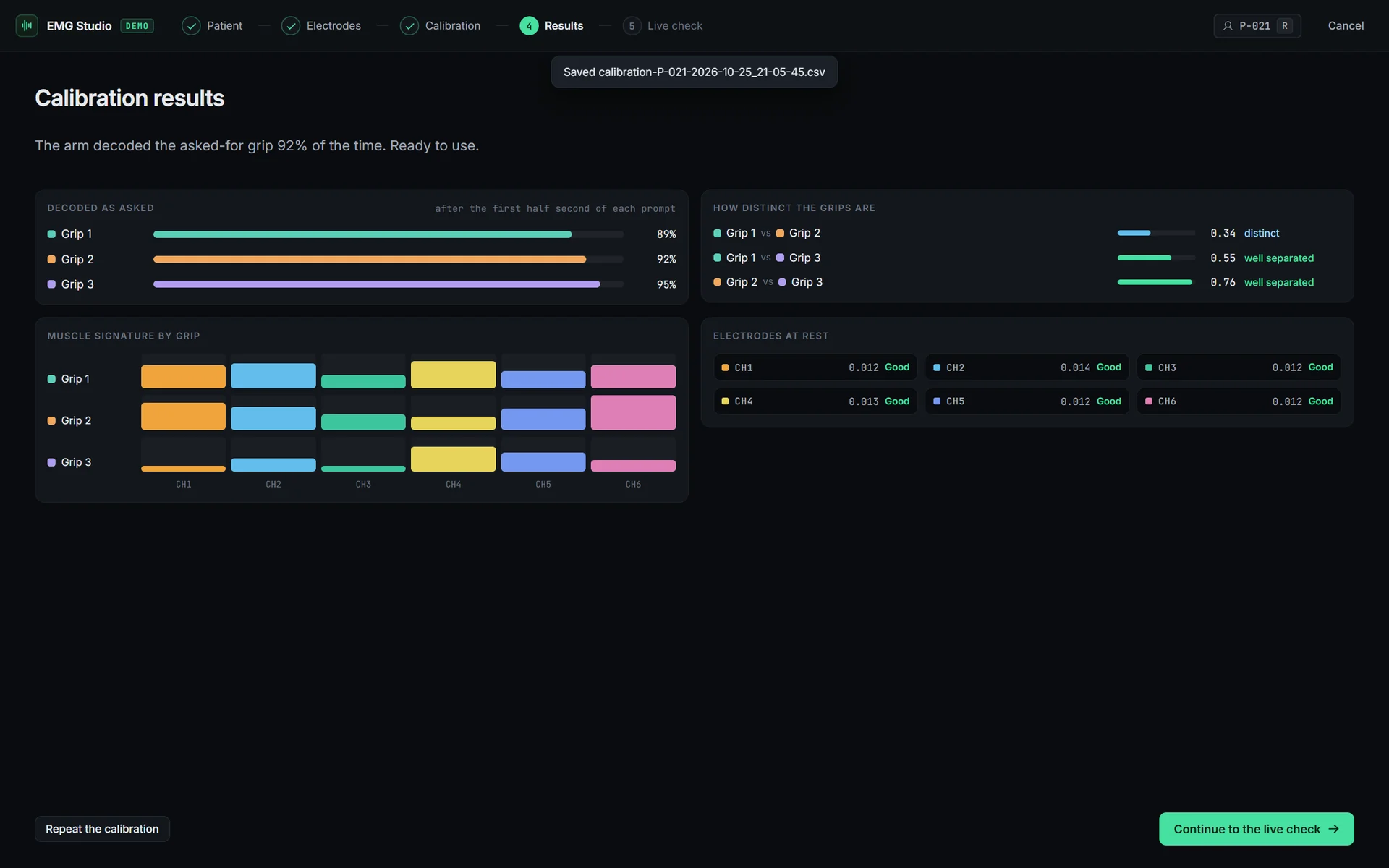
A calibration result, in plain words.

After a guided calibration the clinician sees, for each grip, how often the arm decoded the grip it was asked for, how distinct the grips are from one another and whether every electrode was clean at rest. Then one sentence: ready to use, worth another pass on one grip, or check the electrodes. The patient's reaction time is left out of the score, so a slow start is never counted as a misread.

EMG Studio · patient window
02Key components
Product
01

Six lanes at 60 fps

Samples never pass through React. They land in a two-minute buffer, and uPlot draws each lane from a zero-copy view of it, running slightly ahead of the data between the 30 Hz batches so the trace scrolls smoothly instead of stepping. Each lane scales to its own signal and clips a saturation spike at its edge, so one bad sample cannot flatten the trace. Drag zooms, scroll pans, and M drops a marker into the recording.

Clinical
02

The patient window

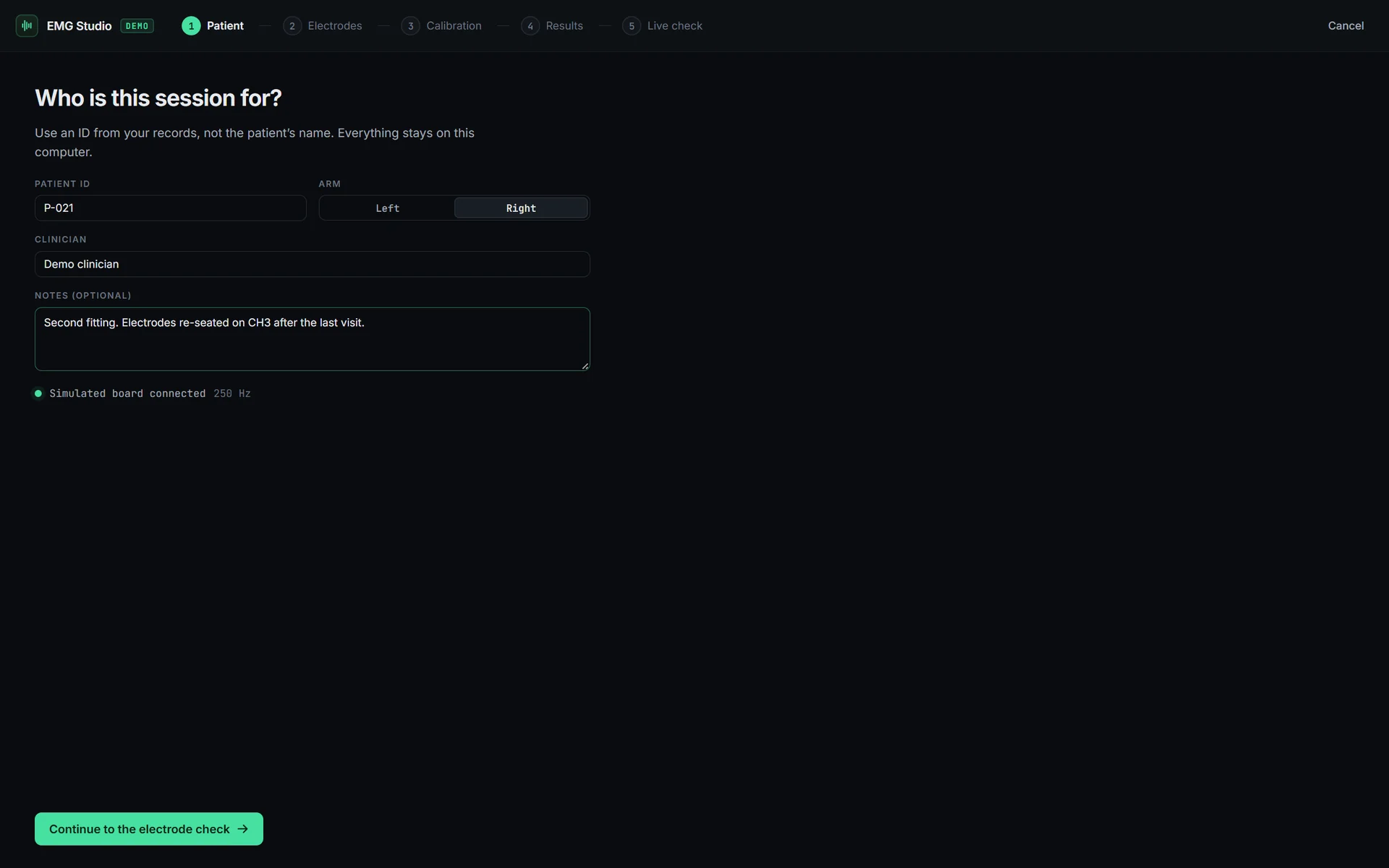
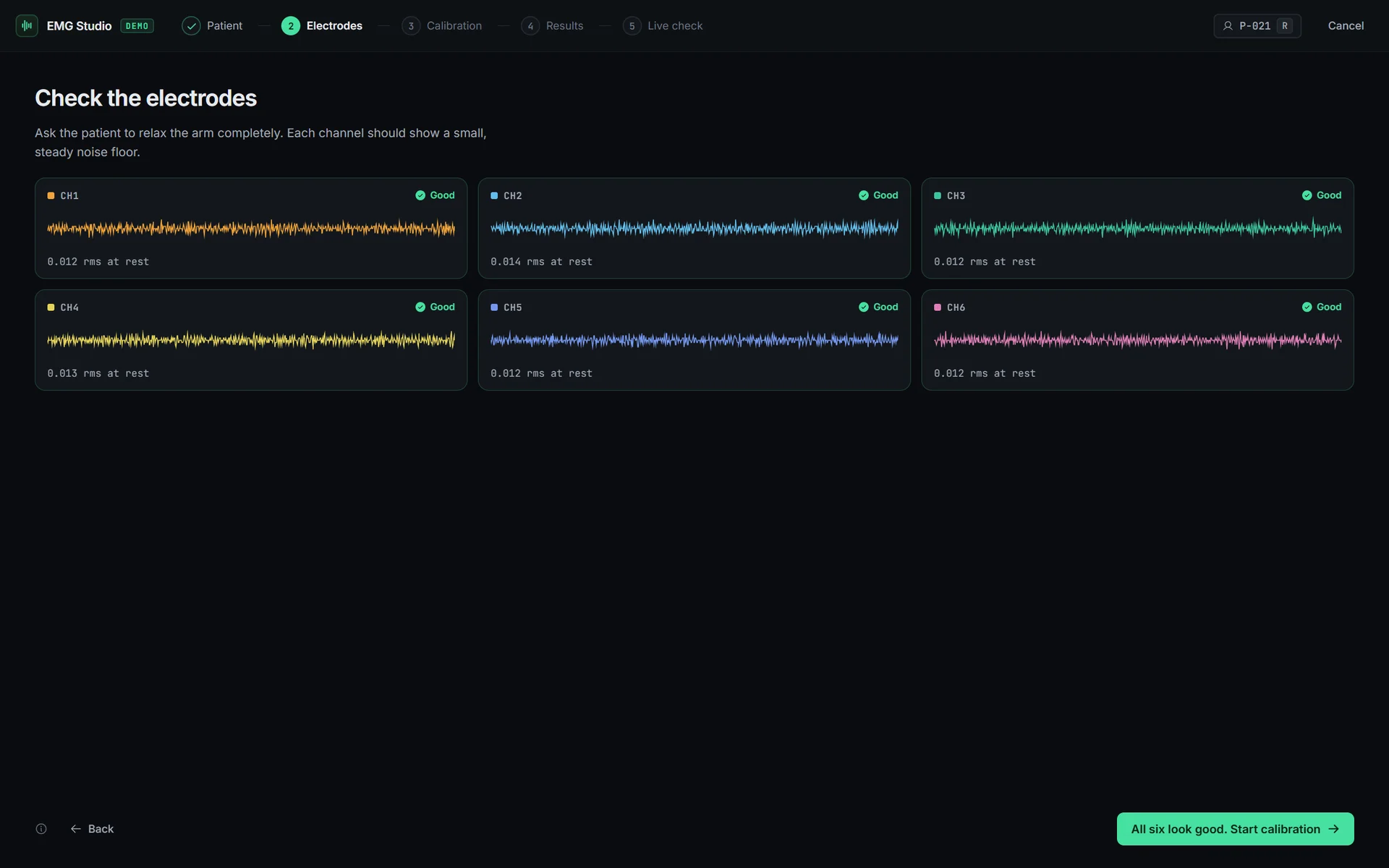
File, New patient session opens a second window built for the appointment: a patient ID that is never a name, an electrode check on each channel's noise floor with the arm relaxed, then each grip prompted in turn with a countdown while the whole run records. Both windows read one broadcast stream, and a window asks for the current state the moment it opens, so it can never miss what was sent before it was listening.

System
03

A simulator on the real data path

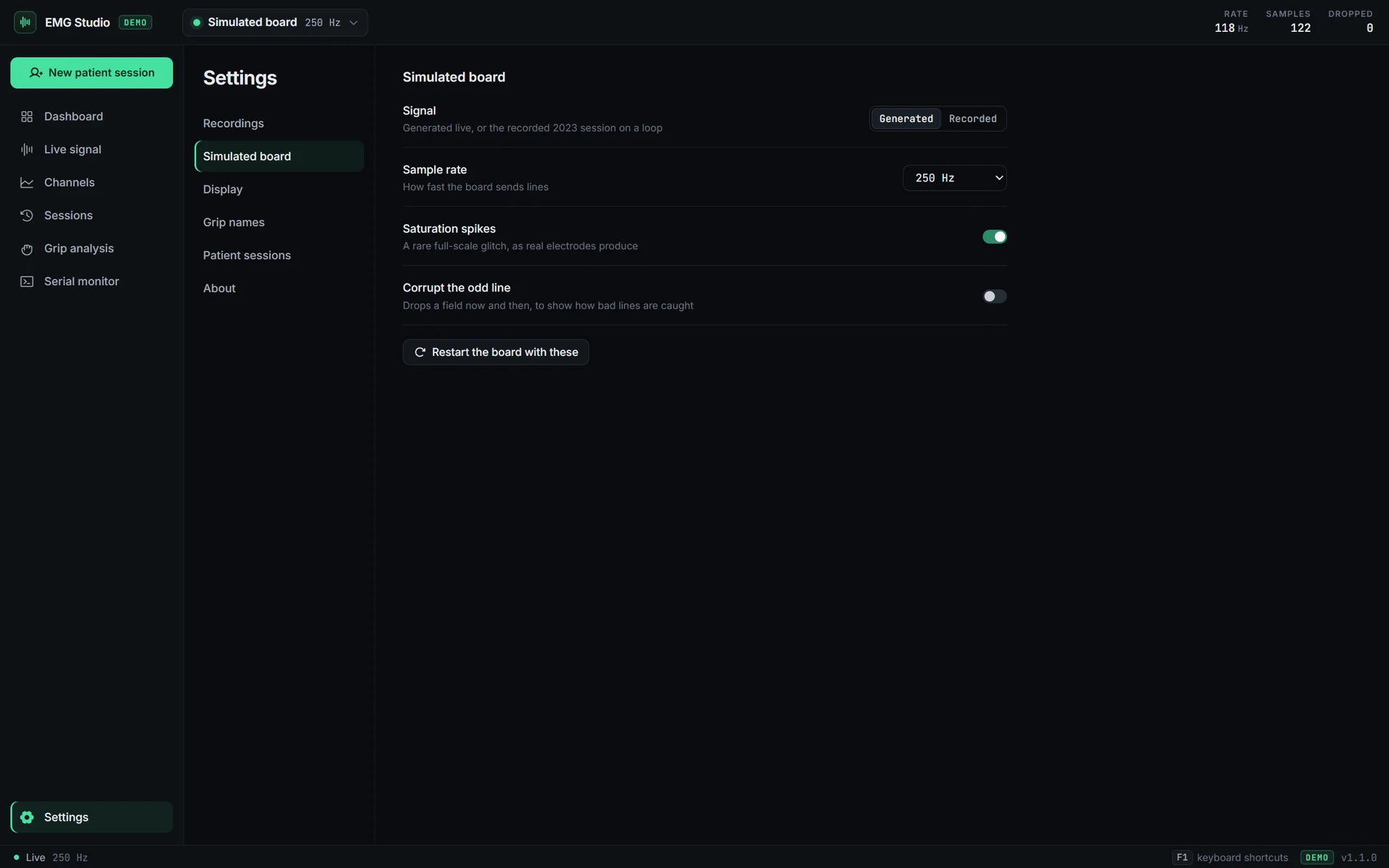
The demo's board is modelled on a real recording from the actual board: 9,750 samples at 250 Hz, each grip driving the six channels at the RMS measured there. It writes text lines into serialport's mock port, so the app reads them through the same parser, batching and recorder as a real COM port. During calibration it follows the prompts with a human reaction time and the odd misread, so results look like a real fitting rather than a flat 100%. Its fault mode corrupts lines on purpose, and the serial monitor shows each refused line with the reason.

Data
04

Sessions anyone can open

Every session is a plain CSV that opens in Excel, MATLAB or pandas, plus a JSON sidecar with the subject, markers, a summary and, for a calibration, its result. A marker that looks like a spreadsheet formula is written as text, so opening a file in Excel cannot run it. The main process only touches files it listed or the user picked, and a deleted session goes to the Recycle Bin rather than disappearing.

Analysis
05

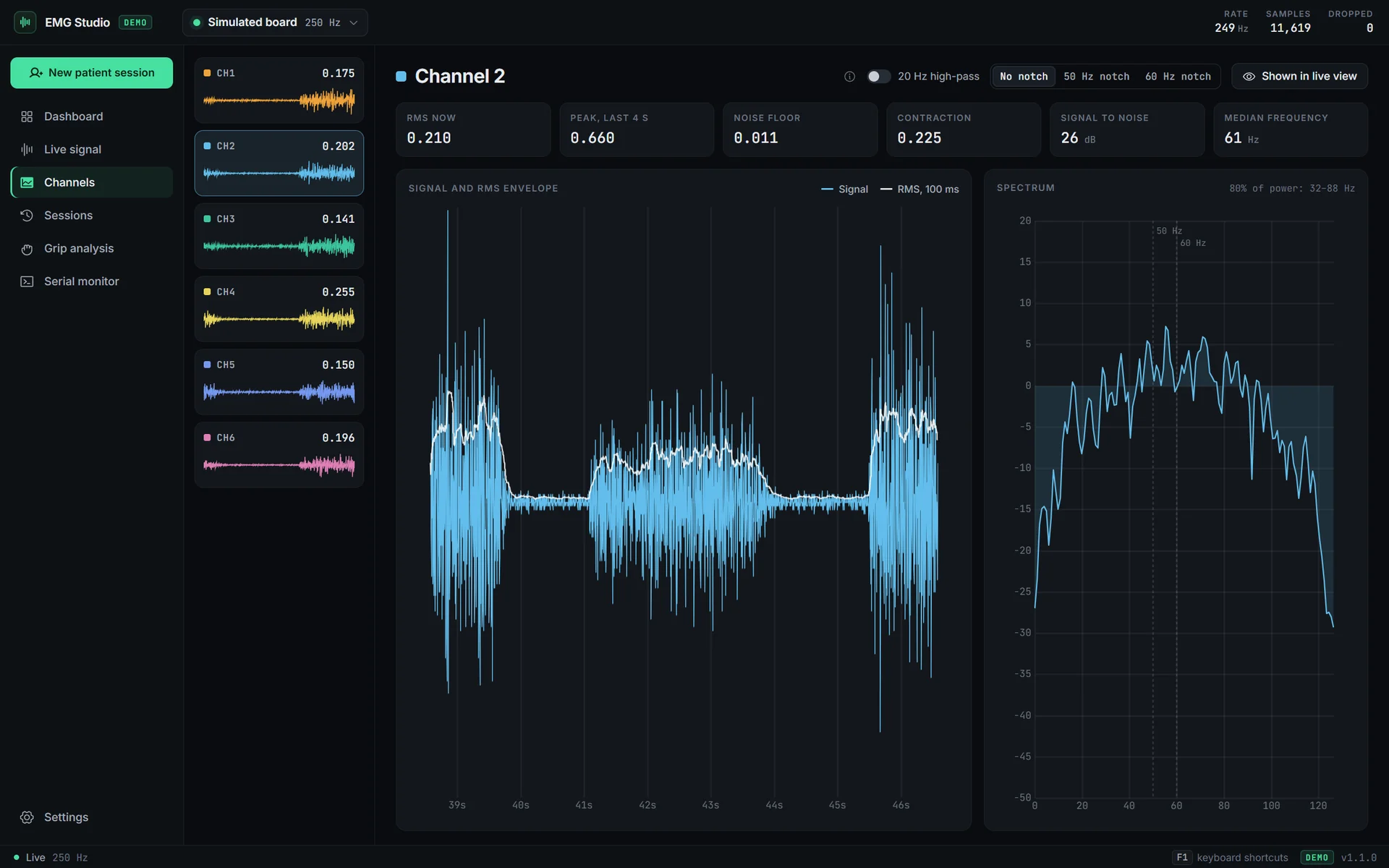
One channel up close

One channel with its 100 ms RMS envelope, a Welch power spectrum with mains hum marked, and the noise floor, contraction level, signal-to-noise and median frequency. The 20 Hz high-pass and the 50 or 60 Hz notch are display-only, so what is recorded is always what the board sent.

03Design philosophy
A dark bench, one live green, every number in mono.
EMG Studio tokens · one live green on a dark bench☾ dark
Live
The board is connected and the signal is live
--live
#46e0a0
Recording
A recording is running, and nothing else
--rec
#ff5b5b
Warning
Dropped lines and noisy electrodes
--warn
#f2b14c
Raised
Cards and panels above the ground
--raised
#13171c
Background
The ground under every screen
--bg
#0a0c0f
Principles
  • Samples never pass through React.
  • A refused line says why it was refused.
  • A patient is an ID, never a name.
  • Every figure is set in mono.
  • Nothing is deleted outright.
Aa InterINTER · UI
252 HzJETBRAINS MONO · FIGURES
04How it was built

A prototype in 2023, then a rebuild that kept what was true: the board's wire format, a real recording and a clinician's job. The core and its tests came first, the screens after.

2023 → Oct 2026
  1. 2023

    A real session on the board

    A labelled recording from the Symbionic sensor board: rest, then each of three grips, three times over. It later became the simulator's source of truth and the test the simulator has to pass.

  2. Aug 2023

    The internship prototype

    An Electron app that opened a saved recording and charted it. The live view over serial, settings and calibration were still unfinished.

  3. Oct 2026

    The core, tested first

    The wire format, a simulator checked against the real recording, the recording format and the settings, as one shared module with its own tests before any screen existed.

  4. Oct 2026

    One data path for three sources

    The board, the simulator and file playback behind one typed IPC, with context isolation and the sandbox on.

  5. Oct 2026

    The workstation

    Live lanes, the decoded grip, recording and playback, then the dashboard, the session log, channel detail, grip analysis and the patient window.

  6. Oct 2026

    An installer and a release pipeline

    A per-user Windows installer for each edition, a release built from a version tag, and an end-to-end run of the real app across every screen.

05Tech stack
Chosen so a clinical tool runs offline on an ordinary Windows laptop, keeps up with the board without dropping a frame, and can be tried by anyone without the hardware.
Application
Electron 45Desktop shell

A native Windows app with real menus, dialogs and the Recycle Bin. Context isolation and the sandbox are on, so windows never see Node, the file system or the port.

electron-vite + TypeScriptBuild · types

One strict shared module for the wire format, simulator, analysis and session format, built once for the main process, the preload and both windows. The edition is fixed at build time.

React 19 + zustandScreens · UI state

React draws the screens and zustand holds what the UI needs to remember. The signal itself never passes through either.

Signal and data
uPlotLive charts

A canvas chart small and fast enough to redraw six 250 Hz lanes at 60 fps from views of a typed buffer, with no copying.

serialport 13USB serial

N-API prebuilds, so there is no native compile step, and a mock port that lets the simulator use the exact path a real board does.

Zod 4Validation

Settings and session sidecars are checked on every read, so a hand-edited or damaged file falls back to safe values instead of crashing, and settings are written atomically.

Quality
VitestCore tests

25 tests on the parser, the simulator against the real recording, the summaries, calibration agreement, spike resistance and the filters.

Playwright for ElectronEnd to end

27 checks that drive the real app, or the installed exe, through every screen and the patient window against a throwaway profile.

GitHub ActionsCI · releases

Tests on every pull request and every push to main, and the installer built on a version tag and attached to a draft release, never from a laptop.

Release and design
electron-builder + NSISInstallers

A per-user installer that needs no admin rights, from two configs: the demo and the standard edition share everything but their data source.

Two editions, one codebaseDistribution

The demo ships with a simulated board and example sessions and connects at launch, so there is nothing to ask a visitor first.

Inter + JetBrains MonoType

Bundled rather than fetched, so the app looks the same offline. Inter for everything read, JetBrains Mono for every figure.

06Gallery
08 frames · click any to view full
07What's next

Demo first. The clinic edition next.

The standard edition is the same app with the board in place of the simulator, and it already builds from this codebase. What stands between it and a clinic is specific.

The standard edition
01Checked against today's board

The wire format comes from the 2023 recording. It is confirmed against the board's current firmware and baud rate before the standard edition ships.

02A signed installer

The installer is not code-signed yet, so Windows SmartScreen asks once. Signing removes that question.

03An update feed

Updates are off until there is a signed feed to take them from.

After that
macOS and Linux buildsTrends across a patient's visitsCalibration reports to share
Try it
Windows 10 and 11, 115 MB, no admin rights. SmartScreen asks once: More info, then Run anyway.
0Boards needed to try every screen
6 × 250 HzChannels drawn live at 60 fps
27End-to-end checks on the real app
Credits
Product and designAlexander Smith
EngineeringAlexander Smith
Signal analysisAlexander Smith
ReleaseAlexander Smith
StatusWindows demo, v1.1
Year2026
Deliverables
  • 01Windows demo installer
  • 02Standard edition for the board
  • 03Board simulator modelled on a real recording
  • 04Guided patient calibration
  • 05Session format: CSV with a JSON sidecar
  • 06Release pipeline and end-to-end suite
Tech stack
Electronelectron-viteTypeScriptReactzustanduPlotserialportZodVitestPlaywrightGitHub Actionselectron-builder
Creative Web Designer & Developer25.2048°N · 55.2708°E

AlexanderSmith

Locating the studio25.2048°N · 55.2708°E